 XanderFiles
XanderFiles › ASICE / BDOC
How to open an ASICE or BDOC file on Android
Signed containers from Estonia, Latvia and the EU
ASICE (ASiC-E), BDOC and EDOC files are envelopes with documents and digital signatures, used in Estonia, Latvia and across the EU. On Android, the free XanderFiles app opens them: it shows who signed and when, and opens the documents inside.
Get it on Google PlayFree · no ads · no sign-up · offline
What is this file
A container holds one or more documents (PDF, DOCX, images) and XAdES signatures. They are made in DigiDoc4 on a computer or with Smart-ID and Mobiil-ID, so contracts, certificates and letters from authorities often arrive this way.
Android cannot open them on its own: you need an app that understands the container.
How to open it
- Install XanderFiles from Google Play. It is free, with no ads and no sign-up.
- Tap the .asice file wherever you have it: in an email attachment, in Telegram, WhatsApp or in Downloads.
- When Android asks which app to use, choose XanderFiles. Or the other way round: open XanderFiles, tap “Open file” and pick the file in Downloads or Google Drive.
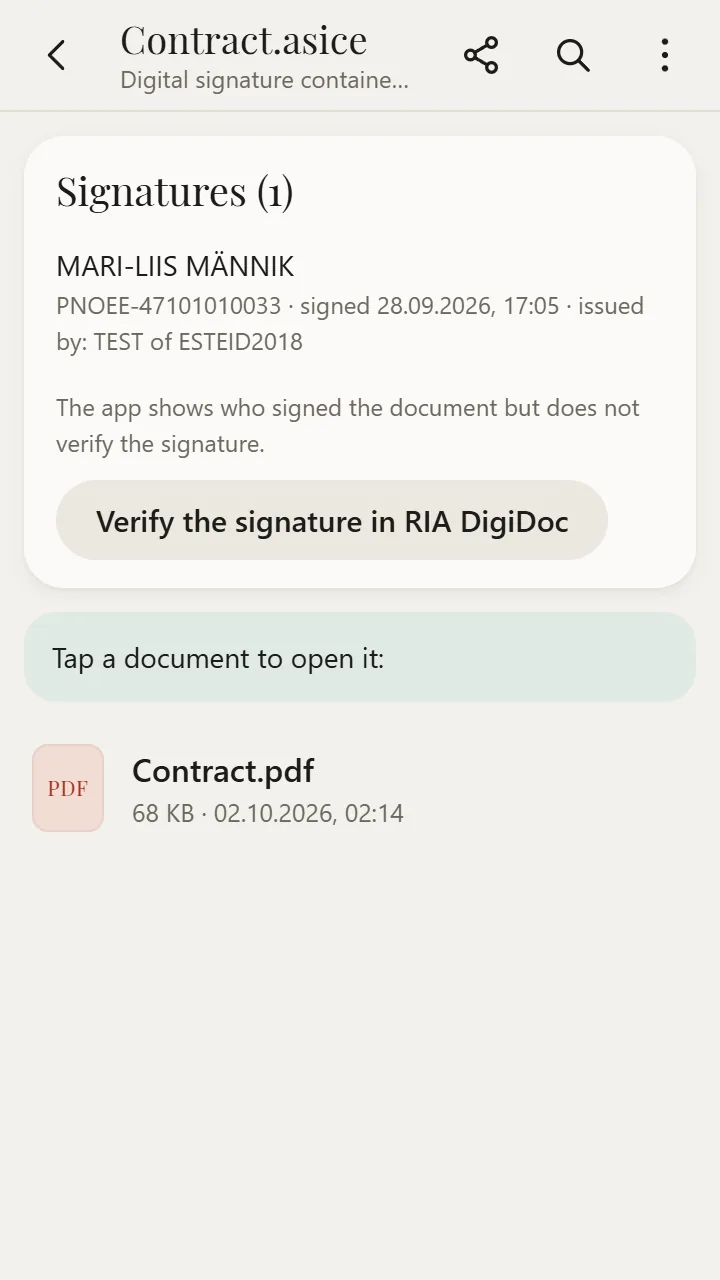
- At the top are the signatures: name, personal code, date and the certificate issuer. Below is the list of documents — tap any of them to open it.
What you can do
- Open the documents inside: PDF, Word, Excel, images
- See who signed (name and personal code) and when
- Send a document from the container elsewhere with “Share”
- All without an ID card, card reader or internet
Good to know
- XanderFiles does not validate signatures and cannot sign. Use the free RIA DigiDoc app for that: if it is installed, XanderFiles shows a “Check the signature in RIA DigiDoc” button.
Questions
Do I need an ID card to read an ASICE file?
No. You only need an ID card to sign. Viewing the documents and signatures works without it.
What is the difference between BDOC and ASICE?
Almost none: BDOC is the Estonian name for the same ASiC-E container, EDOC is the Latvian one. XanderFiles opens all three.
Is it free?
Yes. No ads, no sign-up, and your files never leave the phone.
Other formats
Free · no ads · no sign-up · offline