 XanderFiles
XanderFiles › P7S / P7M
How to open P7S and P7M files on Android
Signed documents and email signatures
A P7M file is a document wrapped in a digital signature, and a P7S file is a separate signature for a document or an email. On Android, the free XanderFiles app opens both: it shows who signed and when, checks the signature and opens the document inside a P7M.
Get it on Google PlayFree · no ads · no sign-up · offline
What is this file
Both are CMS (PKCS#7), the standard format for digital signatures. A P7M file carries the document inside: “contract.pdf.p7m” is a PDF together with its signature. A P7S file is the signature alone: it sits next to the document or comes attached to an email as smime.p7s.
P7M files are common in Italy (e-invoices .xml.p7m and PEC certified email), in public administration and in banking.
How to open it
- Install XanderFiles from Google Play. It is free, with no ads and no sign-up.
- Tap the .p7s file wherever you have it: in an email attachment, in Telegram, WhatsApp or in Downloads.
- When Android asks which app to use, choose XanderFiles. Or the other way round: open XanderFiles, tap “Open file” and pick the file in Downloads or Google Drive.
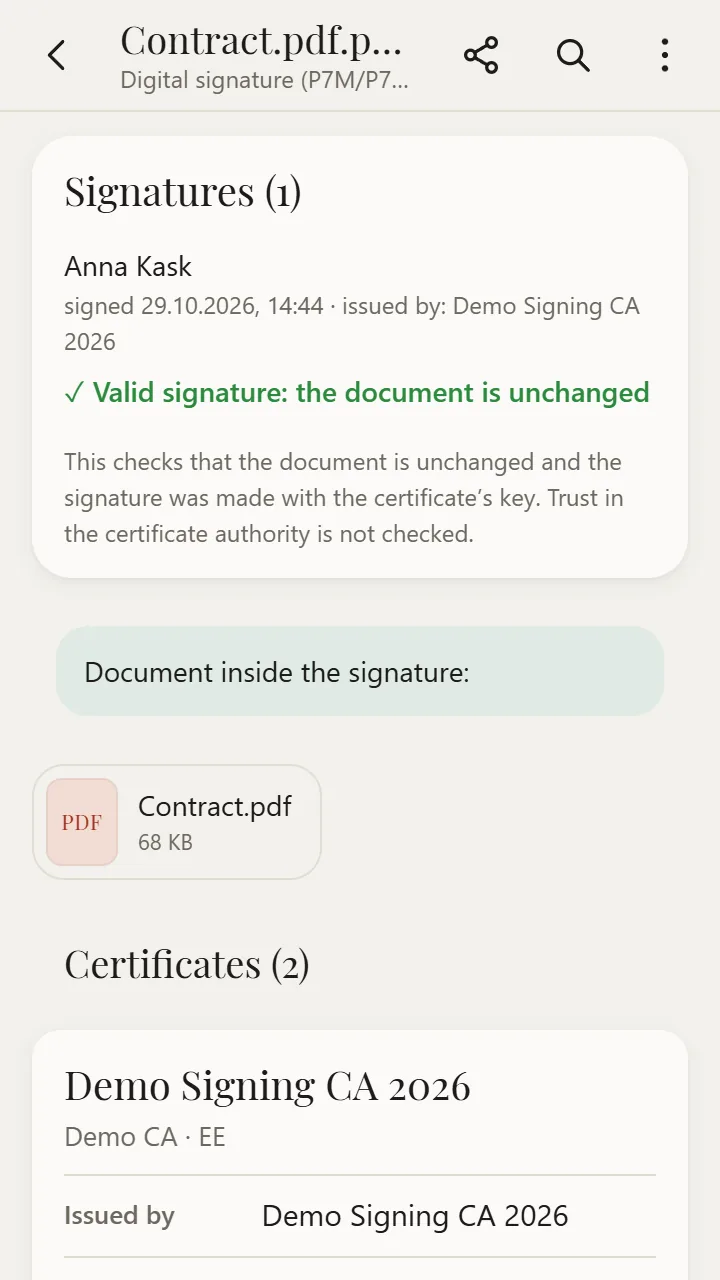
- You will see a signature card: who signed, when, who issued the certificate and the check result. If there is a document inside, it is listed below — tap it to open.
What you can do
- See who signed and when
- Check RSA and ECDSA signatures: “Signature is valid: the document has not changed”
- Open the document inside a P7M: PDF, XML, Word, email and more
- View certificates: issuer, validity, key usage
- Open signatures saved as text (Base64, PEM), as Italian PEC sends them
Good to know
- Trust in the certificate authority is not checked — only that the document is unchanged and was signed with the key from the certificate.
- Russian GOST signatures are shown but not verified.
- A detached P7S signature is checked on its own, not against the document in the other file.
Questions
What is the difference between P7M and P7S?
In a P7M the document is inside the signature; a P7S holds only the signature. That is why you can get the document out of a P7M, while a P7S needs the document as a separate file.
What is smime.p7s in an email?
It is the signature of the email itself: the sender signed the message with a certificate. Open smime.p7s to see who signed it.
Is it free?
Yes. XanderFiles is free, with no ads and no sign-up, and it works offline.
Other formats
Free · no ads · no sign-up · offline