 XanderFiles
XanderFiles › EML
How to open an EML file on Android
Saved emails with all their attachments
An EML file is an email saved as a file, with the sender, subject, text and attachments. On Android, the free XanderFiles app opens EML files like a normal email, and the attachments open right inside it.
Get it on Google PlayFree · no ads · no sign-up · offline
What is this file
Mail apps such as Thunderbird, Apple Mail, Outlook and webmail save messages as EML. People forward them as attachments, export them from mail archives and attach them to support requests.
Inside, an EML file is plain MIME text: headers, the message body and Base64-encoded attachments. Without a mail app it is hard to read.
How to open it
- Install XanderFiles from Google Play. It is free, with no ads and no sign-up.
- Tap the .eml file wherever you have it: in an email attachment, in Telegram, WhatsApp or in Downloads.
- When Android asks which app to use, choose XanderFiles. Or the other way round: open XanderFiles, tap “Open file” and pick the file in Downloads or Google Drive.
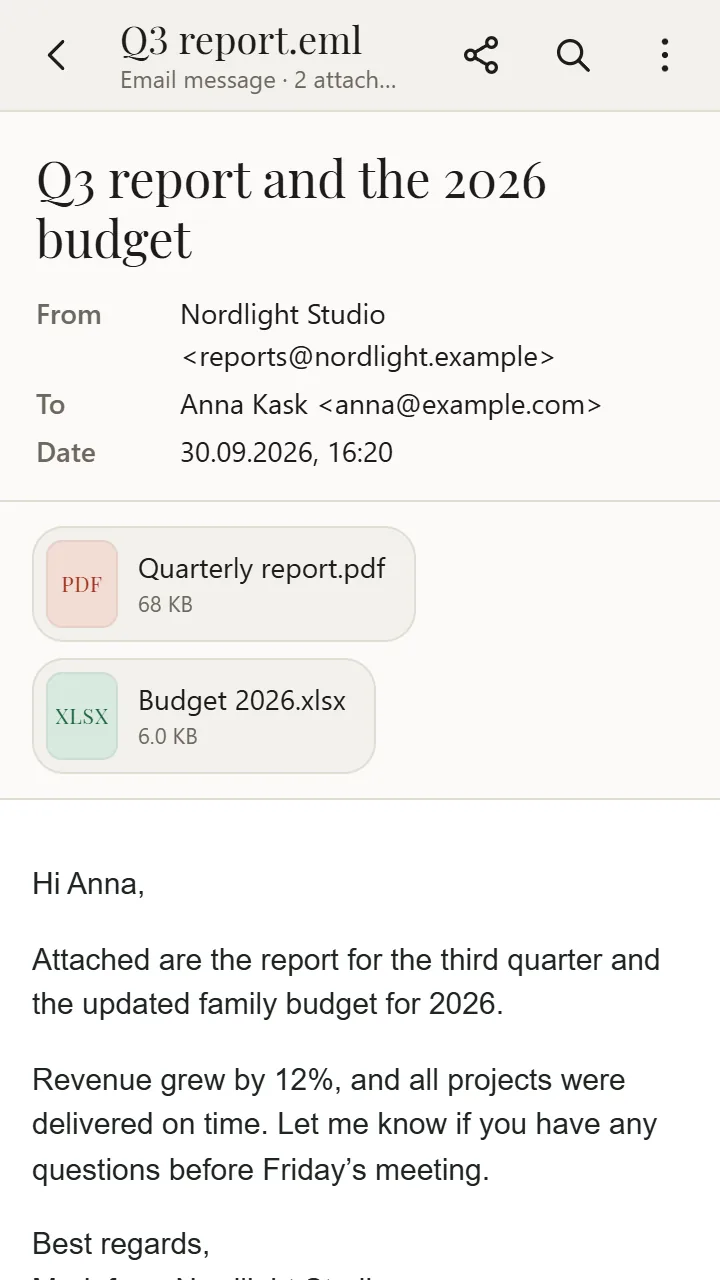
- The email opens: from, to, date and subject, then the formatted text and the list of attachments.
What you can do
- Read the email with its formatting, like in a mail app
- Open attachments: PDF, Word, Excel, photos, archives and even attached emails
- Send an attachment to a messenger, email or Google Drive with “Share”
- Remote images are hidden so the sender cannot track that you opened the email; show them with one tap
Good to know
- Emails encrypted for a recipient’s certificate (S/MIME) cannot be read without the key.
- You cannot reply from the file: XanderFiles is a viewer, not a mail client.
Questions
Do I need an email account to open an EML file?
No. XanderFiles reads the file on your phone, with no sign-in and no internet.
What is the difference between EML and MSG?
EML is an open standard written by almost every mail app; MSG is Outlook’s own format. XanderFiles opens both.
Is it free?
Yes. No ads, no sign-up, and your files never leave the phone.
Other formats
Free · no ads · no sign-up · offline