 XanderFiles
XanderFiles › winmail.dat
How to open winmail.dat on Android
Get the attachments out of Outlook’s winmail.dat
winmail.dat is a wrapper in which Outlook sometimes hides the attachments and formatted text of an email. People who do not use Outlook see a mysterious winmail.dat instead of the files. On Android, the free XanderFiles app opens it and gets everything out.
Get it on Google PlayFree · no ads · no sign-up · offline
What is this file
It happens when the sender writes in Outlook using Rich Text: Outlook packs attachments and text into the TNEF format and sends them as one winmail.dat file. Gmail and phone mail apps do not understand it.
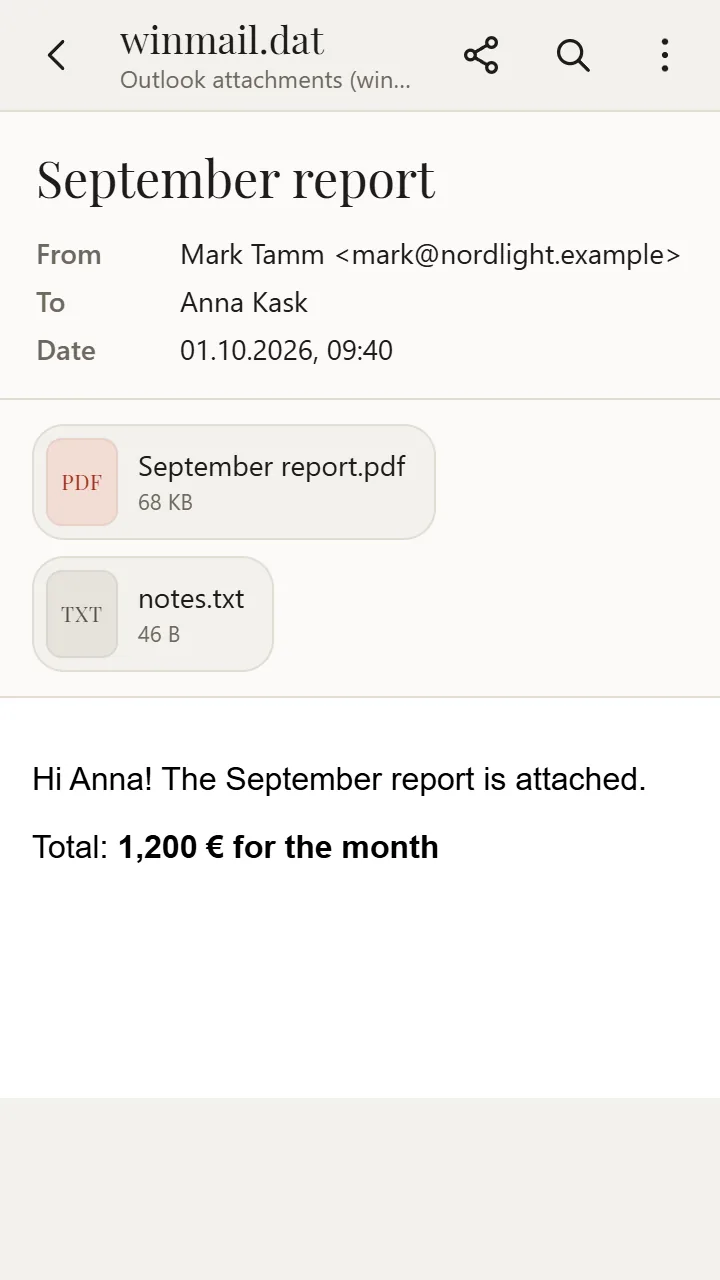
Inside are the actual attachments (documents, spreadsheets, photos) with their real names, plus the subject, the sender and the text of the email.
How to open it
- Install XanderFiles from Google Play. It is free, with no ads and no sign-up.
- Tap the winmail.dat file wherever you have it: in an email attachment: save it or tap it and choose “Open with”.
- When Android asks which app to use, choose XanderFiles. Or the other way round: open XanderFiles, tap “Open file” and pick the file in Downloads or Google Drive.
- You will see the attachments with their real names and the email text. Tap a file to open it.
What you can do
- Get attachments out with their correct names, including non-Latin ones
- Read the email text, HTML or RTF
- Open attachments right inside the app: PDF, Word, Excel, photos
- Open attached emails that are wrapped in TNEF as well
Good to know
- If winmail.dat holds only formatting, there are no attachments in it. Ask the sender to resend the email as HTML.
Questions
Why did I get winmail.dat instead of an attachment?
The sender uses Rich Text format in Outlook. They can switch to HTML; until then, open winmail.dat in XanderFiles.
Is winmail.dat a virus?
No, it is just an Outlook wrapper. As with any attachment, only open files from senders you know.
Is it free?
Yes. No ads, no sign-up, and your files never leave the phone.
Other formats
Free · no ads · no sign-up · offline